As today is the last date to select or book your Exam City, Slot, and Date, candidates who have not selected their preference yet must hurry up and choose now. After this, no request for slot selection or change will be accepted. If the candidates are assuming that without filling the prefernce, the commission will allot them an exam centre on their own, then you must note that only the candidates who complete the slot booking process will be issued with admit cards.
SSC MTS Slot Booking 2026 Out
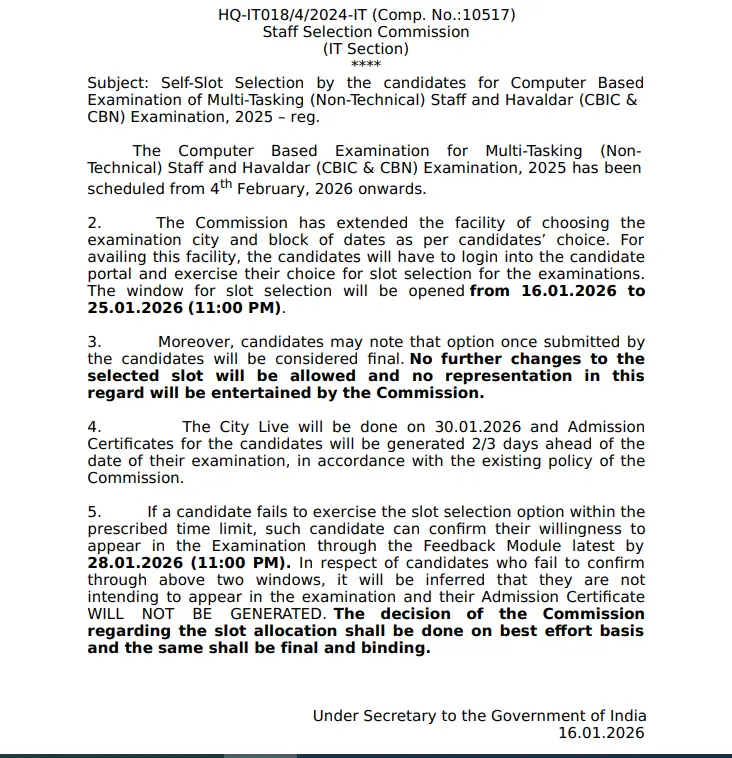
Candidates who have applied for Multi-Tasking (Non-Technical) Staff and Havaldar (CBIC & CBN) Examination, 2025 can opt SSC MTS Slot Booking facility before 11 pm. Candidates should log in with their registration ID and password to choose their preferred exam shift, date, and location. Through this exam, a total of 7948 vacancies will be filled for MTS and Havaldar posts.
| Activity | Details |
| Organisation | Staff Selection Commission (SSC) |
| Exam Name | Multi-Tasking (Non-Technical) Staff and Havaldar (CBIC & CBN) Examination, 2025 |
| SSC MTS City Intimation 2026 | 30th January 2026 |
| Portal Activation | 16th to 25th January 2026 (11 pm) |
| SSC MTS Admit Card 2026 | 1st February 2026 |
| SSC MTS Exam Date 2026 | 4th February 2026 onwards |
| Facility | Choose city, date, and exam shift |
| Change Option | Not allowed after submission |
| Language Limitation | Fewer slots for regional languages |
| Official Website | www.ssc.gov.in |
SSC MTS Self Slot Booking 2026 Official Link
The SSC has introduced a self-slot selection system to make exam scheduling more candidate-friendly and efficient. Staff Selection Commission (SSC) is accepting the request for SSC MTS Self Slot Booking 2026 for Multi-Tasking (Non-Technical) Staff and Havaldar (CBIC & CBN) Examination, 2025.
Steps for SSC MTS Self Slot Booking 2026
The officials have released the notice regarding the dates and steps for Self-Slot Selection for SSC MTS Examination 2025. Follow the Step-by-Step Guide for SSC MTS Exam Slot Booking.
- Visit the official website of the Staff Selection Commission (SSC) at www.ssc.gov.in
- Go to the Candidates Portal, log in using your credentials, and go to “My Application”.
- Select an option. Click on Select City, Exam Date, and Shift.
- Select a preferred date for the examination and click Get Slot Details.
- Select slots (date and shift) for the three cities chosen during the application.
- After choosing a date and shift, confirm the choice by validating the OTP (sent to the registered mobile number or email ID).
- Click Validate & Submit to finalise.
- Once submitted, the slot, city, and shift cannot be changed under any circumstances.
| Related Links | |
| SSC MTS Exam Pattern 2026 | SSC MTS Syllabus 2026 |
| SSC MTS Previous Year Question Paper PDFs | SSC MTS Salary, Job Profile & Prospects |
| SSC MTS Previous Year Cut Off | SSC Calendar 2026 |



 SSC CGL Shift Timings 2026: Check Tier 1...
 SSC CPO 2026: 7 Major Changes Aspirants ...
 SSC CHSL 60 Day Study Plan 2026: Day-wis...