
SSC CGL Apply Online 2026 Ends Today, Application Link Active at ssc.gov.in
- Home
- SSC CGL Apply Online 2026
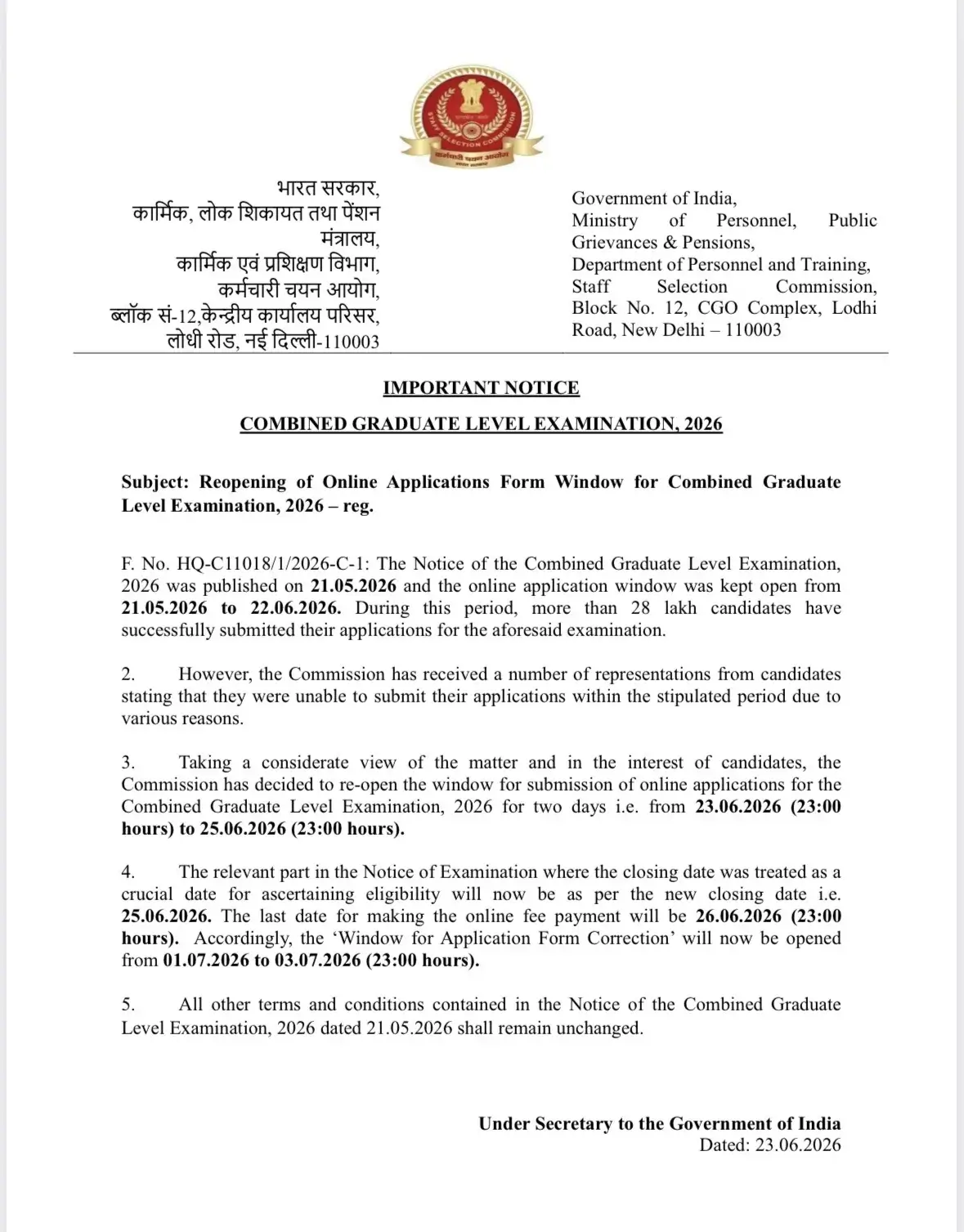
The Staff Selection Commission is accepting online applications for SSC CGL Exam 2026 from graduate candidates. Candidates have to submit their online forms only through the SSC official website, www.ssc.gov.in, or the direct link provided in the article. The last date for submitting the application forms was extended till 25th June 2026 (11 pm) and today is the last day to apply. Candidates who were unable to apply due to any reason must submit their applications now without any further delay. Check the direct application link, fee, last date, step-by-step form-filling guide, and correction window dates here.
SSC CGL Apply Online 2026
Candidates who meet SSC CGL 2026 eligibility criteria must complete their registration before the deadline; applications submitted through any mode other than online will not be accepted. Candidates with a bachelor's degree in any discipline, aged between 18 and 32 years (with relaxation for reserved categories), can apply online for SSC CGL 2026 at www.ssc.gov.in or through the mySSC mobile app.
| Activities | Dates |
| SSC CGL Notification & Apply Online Starts | 21st May 2026 |
| SSC CGL Apply Online Starts | 21st May 2026 |
| Window Reopen | 23rd June 2026 (11 pm) |
| Last Date to Apply | 25th June 2026 (11 pm) |
| Last Date for online fee payment | 26th June 2026 (11 pm) |
| The window for Application Form Correction | 1st to 3rd July 2026 (23:00 hours) |
| SSC CGL Exam Date 2026 | August-September 2026 |
SSC CGL Apply Online 2026 Link
The SSC CGL 2026 application link is active now. Candidates must complete their registration before 25th June 2026 (11:00 PM) to be considered for the 12,256 vacancies announced this year. As the application process is ongoing, we have provided a direct link below to apply online for the SSC Exam 2026.
SSC CGL Apply Online 2026 Link (Active)- Click Here
For Complete details for the recruitment, visit our SSC CGL 2026 Page
SSC CGL Application Fee 2026
The application fee can be paid online via BHIM UPI, Net Banking, or Visa/Mastercard/Maestro/RuPay Credit or Debit cards. A candidate must pay Rs. 100/- as to SSC CGL 2026 Online Application Fee. The details of the examination fees for each category are given below:
| Category | Application Fee |
| General/ OBC | Rs. 100 |
| Female, SC, ST, PwD, & Ex-Servicemen | Nil |
Steps for SSC CGL 2026 Apply Online
SSC CGL Application Process must be carried out only in online mode at the new website of SSC Headquarters, i.e., https://ssc.gov.in or through the my SSC mobile application (which can be downloaded from the Google Play Store)
Candidates are supposed to apply online to register and appear for SSC CGL 2026. Given below are the steps that a candidate would need to take for successful online registration for the exam:
The process of filling online application for the examination consists of four parts:
Part I. SSC One-Time Registration (OTR)
Part II. Filling out Online Application for the Examination
Part III. Uploading of Documents
Part IV. Fee Submission
Part 1. Register as a New User (One-Time Registration)
If you are apply for SSC Exams first time, click on the "New User? Register Now" link appearing on the right side of the homepage. Now submit the One-Time Registration (OTR) form with the personal details required-
| Particular | Details |
| Personal Information | Name Date of Birth Gender |
| Contact Details | Mobile Number Email ID |
| Educational Qualification | 10th Roll Number Board Name Passing Year |
| Photo ID Details | Aadhar Card Voter ID PAN Card Passport or any valid ID |
Note- This SSC One-Time Registration (OTR) can be used for all upcoming SSC Exams also.
Part 2. SSC CGL Online Form Filling
- Return to the SSC website and log in using your Registration ID and Password. If already registered, use your existing credentials to log in.
- Now click on “Apply” appearing on the right side of the homepage. After that, click on “Apply” in front of Combined Graduate Level Examination,2026.
- A new page with url- https://ssc.gov.in/login appears on the screen. Candidates are required to log in with the provided Registration ID, date of birth and password to complete registration for SSC CGL 2026.
- Click on submit button to submit your online application form for SSC CGL. It is advised that candidates verify their details before submitting the form. All the candidates will be issued a Registration ID for SSC CGL 2026 exam.
Part 3. Upload Documents
In the next step, candidates are required to upload photographs and signatures by following the requisites mentioned by the Staff Selection Commission of India.
Photograph - The photograph of a candidate must be taken in front of white color or light colored background. The live photo has to be captured as per guidelines.
Signature - The signature provided by the candidate must be in black or blue ink on the white sheet. The scanned copy of the signature that needs to be submitted must be in jpg format and it should be more than 1 kb and less than 12 kb in size. The resolution of the image should be 40*60 pixels in width and height.
Other documents (if applicable): Photo ID proof (Aadhaar, voter ID, etc.), Caste/community certificate (for SC/ST/OBC candidates), Medical certificate (for PwBD candidates), Discharge certificate (for ex-servicemen)
NEW- Now the candidate is not required to have a pre-existing photograph of himself/ herself. Now, the candidate have to capture a photograph while filling up the application form. For
this purpose, the candidate has to stand / sit before the camera and follow the following instructions while capturing the photograph.
Part 4. Fee Submission
- Now the candidates are required to the application fee.
- The fee is to be paid through online mode (Debit/Credit/Net Banking/Wallet, etc.).
Specifications in SSC CGL Online Application 2026
While uploading the photograph and signature, the applicants must go through the specifications required which have been tabulated below.
| Parameters | Size | Pixels |
| Photograph | 20 KB to 50 KB | 100*120 |
| Signature | 1 KB to 12 KB | 40*60 |
Note- The signature must be in black or blue ink on a white sheet & the photograph must be clicked in front of white colour or light-colored background.
Documents Required for SSC CGL Apply Online
For SSC CGL Application, the candidate needs the following documents/details:
a) Mobile Number (to be verified through OTP)
b) Email ID (to be verified through OTP).
c) Aadhaar number. If the Aadhaar number is not available, please give one of the following ID Numbers. (You will be required to show the original document at a later stage):
- Voter ID Card
- PAN
- Passport
- Driving License
- School/ College ID
- Employer ID (Govt./ PSU/ Private)
d) Information about the Board, Roll Number and Year of Passing the Matriculation (10th) Examination.
e) Disability Certificate Number if you are a person with a benchmark disability.
Important Points to Remember
- The application process is entirely online. No other mode of application will be accepted.
- Email ID and mobile number should be kept active for any future correspondence. The authorities will communicate with candidates through Email and SMS.
- Evidence for claims made by the candidate while applying online should be uploaded by the candidate at the time of registration itself. The same will be verified subsequently at the time of the Certificate Verification and Interview process
- Candidates must fill out the complete form before the last date of online mode.
- Save the Application and Acknowledgement documents for future reference.
- Candidates should indicate their order of preferences at this stage. No requests for change in this connection shall be entertained.
SSC CGL Application Form Correction 2026
SSC will open the correction window from 29th June to 1st July 2026, allowing candidates to rectify errors in their submitted application. The correction fee for the first time is Rs. 200 and for the second correction is Rs. 500.
Fields That Can Be Corrected in the SSC CGL Application Forms are:
- Personal Details
- Contact Details
- Educational Qualifications
- Exam Center Preferences
- Post Preferences
- Category
- Uploaded Documents
Note: The Registration ID cannot be changed, as it is linked to the One-Time Registration (OTR) profile.
Important Points to Remember
- The application process is entirely online — no offline or postal applications are accepted.
- Keep your registered mobile number and email ID active; all official communication is sent via SMS and email.
- Upload all supporting documents accurately at the time of registration, as they will be verified during Certificate Verification.
- Do not wait until 25th June — heavy last-day traffic on the SSC portal can cause submission failures.
- Save and print your final acknowledgement slip after successful fee payment.
- Choose your exam centre and post preferences carefully — late changes attract a correction fee.