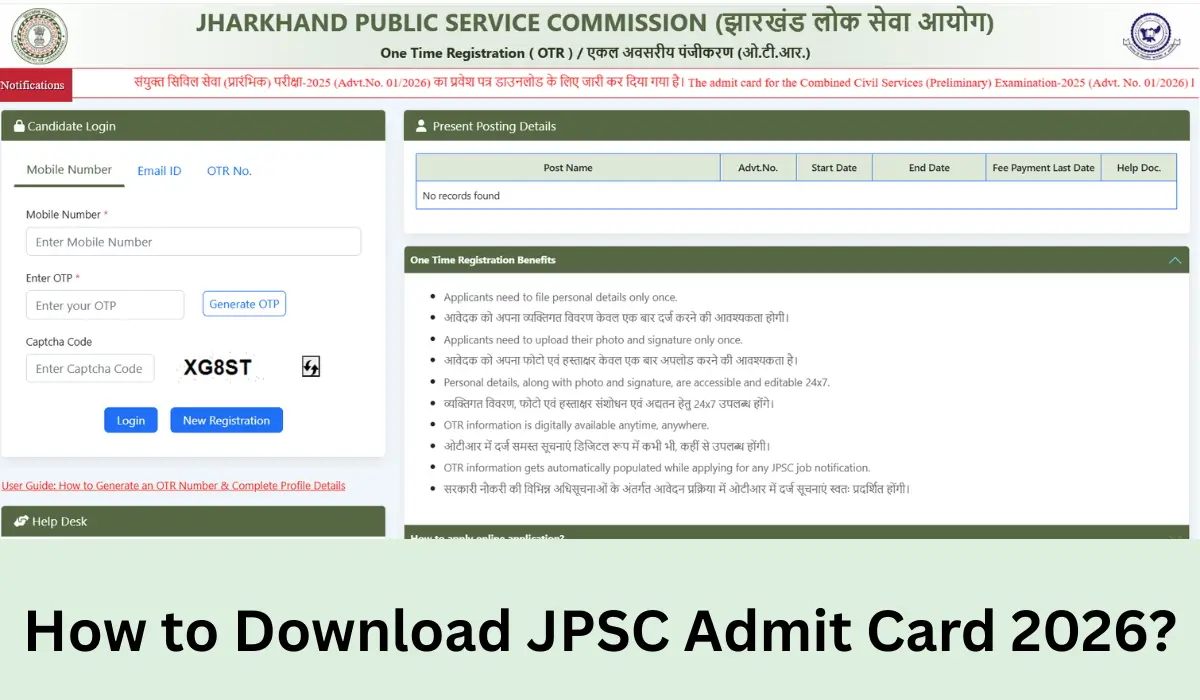
To download your JPSC Prelims Admit Card 2026, visit www.jpsc.gov.in and navigate to the “Hall Ticket” tab to download the hall ticket. Candidates are advised not to wait for the exam day (19 April) and download their admit cards well before. This article explains a step-by-step guide & everything you must check before your exam day.
How to Download JPSC Admit Card 2026?
Visit the official JPSC portal directly. Do not use third-party websites — only download from the official link below to avoid fraud or incorrect documents.
Step-by-Step Download Guide
1. Go to the Official JPSC Website
Open your browser and go to www.jpsc.gov.in. Make sure you are on the official government domain — the URL must end in .gov.in.
2. Click on the “Admit Card / Hall Ticket” Section
On the homepage, look for the “Admit Card” or “Download Hall Ticket” link. It is usually displayed as a scrolling notification or under the Latest News / Notifications section.
3. Select the Correct Exam / Post
A list of active exams will appear. Click on the relevant JPSC 2026 exam notification for which you have applied (e.g., Civil Services / Combined, etc.).
4. Enter Your Login Credentials
Enter your Registration Number / Application ID and Date of Birth (DD/MM/YYYY) or password as registered during the application process.
5. Click “Submit” and View Your Admit Card
After logging in, your admit card will appear on the screen. Verify all details — name, roll number, exam centre, date and time — before downloading.
6. Download and Print
Click the Download / Print button. Save the PDF. Take at least two printouts on A4 paper. A black-and-white printout is acceptable but must be clear and legible.
Note- Candidates appearing without a valid printed admit card will NOT be allowed to enter the examination hall under any circumstances. Entry is strictly subject to the presentation of the admit card alongside a valid government-issued photo ID.
What to do if Forgot Password or Registration Number?
If you have forgotten your login credentials, follow these steps immediately — do not wait until exam day:
- Click “Forgot Password” on the login page and reset via your registered mobile or email
- Your registration number is available in the confirmation email sent at the time of application
- Contact JPSC helpdesk directly if you cannot access your account — call during official office hours
JPSC Admit Card 2026 Download Link
The official link to download JPSC Prelims Admit Card has been shared below for your reference. Candidates who have their prelims exam on 19th April 2026, can directly download by clicking the link and entering their login creditinals.
What to Check on Your JPSC Admit Card?
✓ Candidate’s full name (matches your ID proof)
✓ Roll number and registration number
✓ Exam date, reporting time and exam time
✓ Exam centre name, address and city
✓ Subject/Paper details
✓ Photograph and signature are clearly visible
✓ Category and post applied for






 MP SI Admit Card 2026 Out, Download Sub ...
 UPSSSC PET Admit Card 2026 Out, Hall Tic...
 PSSSB Group D Admit Card 2026 Out, Hall ...