
SSC CGL City Intimation Slip 2026 Out, Check Your Exam City & Date
- Home
- SSC CGL City Intimation Slip 2026
Last Updated: 25 September 2026
Staff Selection Commission (SSC) has released SSC CGL City Intimation Slip 2026 for Tier 1 examination on its official website www.ssc.gov.in. The city slips are released for candidates who have applied for 10731 Group B and Group C vacancies. The exam city slips has been released for candidates whose applications has been accepted. Scroll down the article for direct link to check your exam city, acceptance status and scheduled exam date.
SSC CGL City Intimation 2026 Out
SSC CGL Tier 1 is to be held from 30 September to 30 October 2026 in Computer-Based Examination (CBE) mode across various exam cities throughout the country. SSC has activated the exam city intimation facility on its official website, ssc.gov.in, so that candidates can know their alloted exam city well before their exam date. Candidates can log in with their registration number/username and password to download their city slips.
Latest Update (as on 25 September)
- The exam city slips are available for candidates whose exam is scheduled till 5 October 2026.
- The application acceptance status has been informed to all applied candidates.
- The admit card will be available to download from 27 September 2026 onwards.
| SSC CGL Exam City Intimation Slip 2026: Overview | |
|---|---|
| Exam Name | Combined Graduate Level Examination 2026 |
| Conducting Body | Staff Selection Commission |
| Tier | Tier 1 |
| Document | City Intimation Slip |
| Mode of Exam | Computer-Based Examination |
| Vacancies | 10731 |
| City Intimation Slip | 22 September 2026 |
| SSC CGL Admit Card 2026 | 27 September 2026 |
| SSC CGL Exam Date 2026 | 30 September to 30 October 2026 |
| Candidates Applied | 28 lakh (approximately) |
| Selection Stages | Tier 1 & Tier 2 |
| Official Website | www.ssc.gov.in |
SSC CGL Exam City Intimation 2026 Download Link
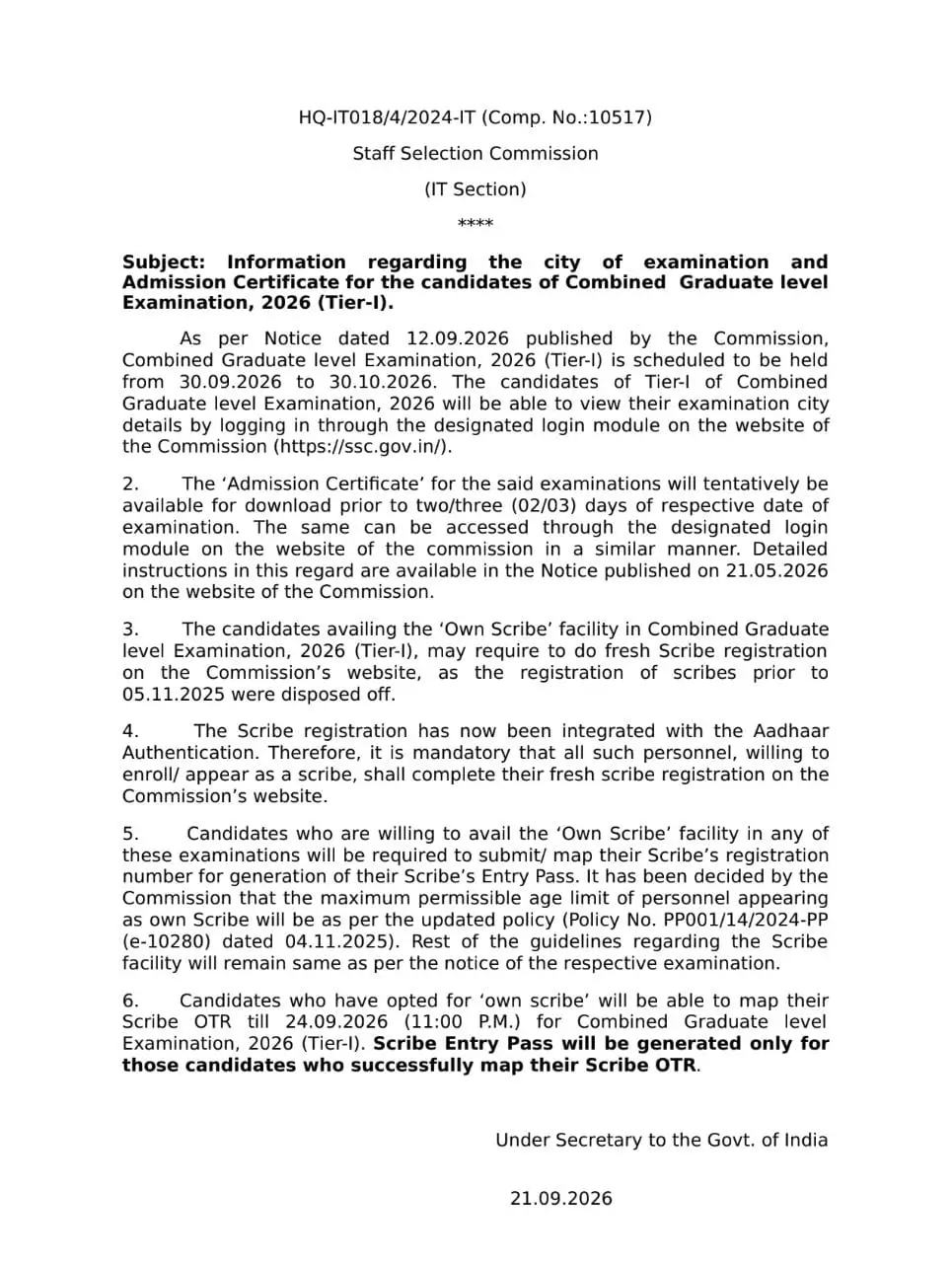
The SSC CGL Tier 1 City Intimation Slip 2026 download link is active on the official SSC website. Candidates can log in to the SSC portal and check their allotted examination city and scheduled exam date. The exam city details are shared only with the candidates whose exam is till 5 October 2026; however, exam dates have been announced to all candidates.
SSC CGL Exam City Intimation Slip 2026 Link (Active)- Click to Check
If you are unable to see your alloted exam city, then you have to login again after few days as till now, the exam city information has been released only for the exam scheduled till 5 October 2026.
It is not the SSC CGL admit card and cannot be used as an entry document at the examination centre. The admit card will be released on 27 September containing the detailed examination centre address, reporting time and exam-day instructions.
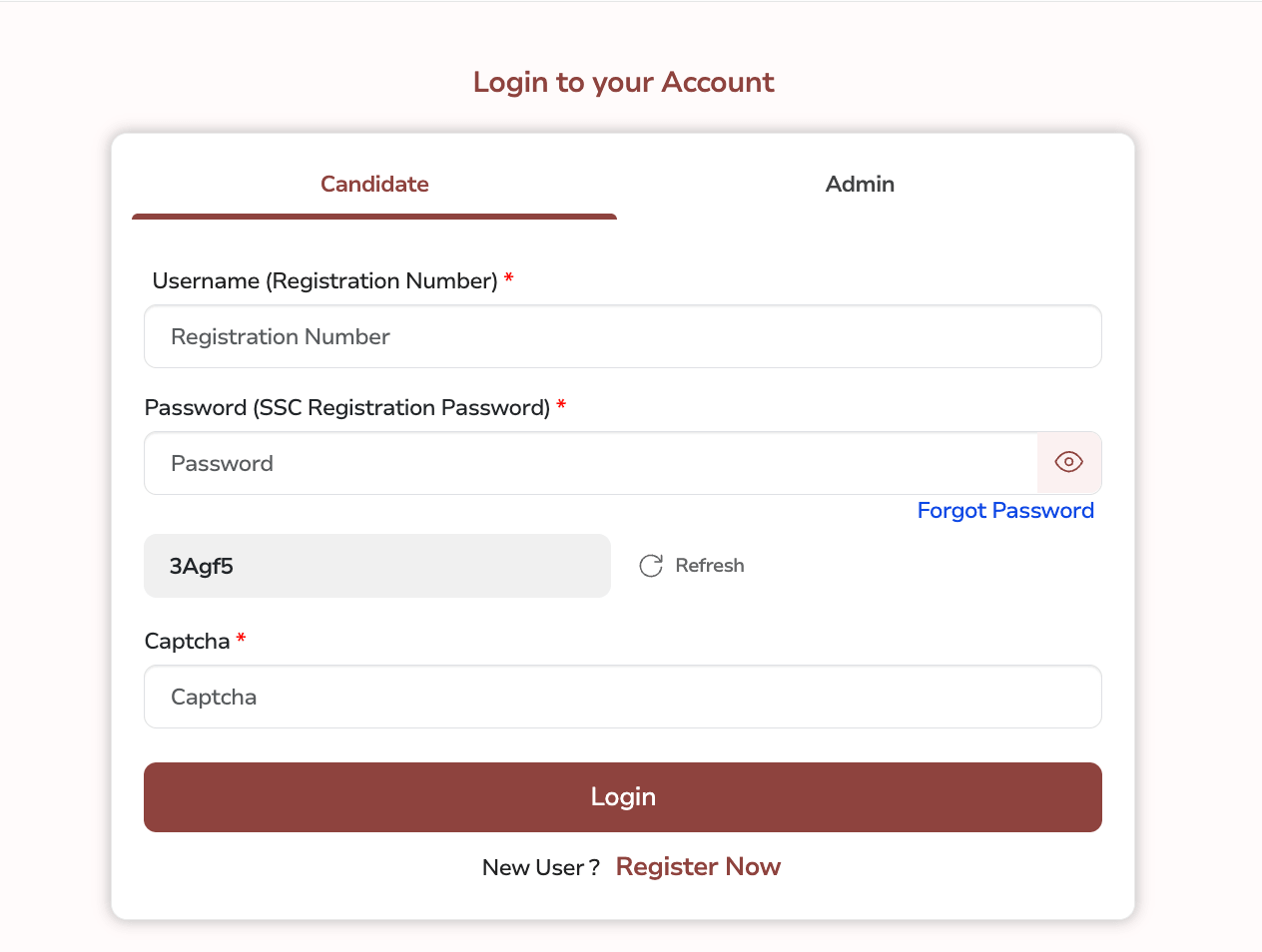
Login Credentials Required to Download CGL Tier 1 Exam City Intimation Slip
Candidates must keep the following login details with them to check their exam city slips.
- Username (Registration Number)
- Password (SSC Registration Password)
- Captcha Code
How to Check SSC CGL Exam City Intimation 2026 from ssc.gov.in?
Candidates can follow the step-by-step process below to check and download the SSC CGL Tier 1 City Intimation Slip 2026.
Step 1: Visit the official SSC website, ssc.gov.in.
Step 2: Click on Login/Register.
Step 3: Enter your Registration Number/Username and Password.
Step 4: Open the SSC CGL 2026 examination section from your dashboard.
Step 5: Look for the SSC CGL Tier 1 City Intimation Slip/Exam City link.
Step 6: Click on the link to view your allotted examination city and scheduled examination details.
Step 7: Check all the information carefully and save the city intimation details for future reference.
SSC CGL City Intimation Slip 2026 Not Showing? Here's What to Do
SSC may provide city-related information according to the candidate's scheduled examination date. Candidates whose city information is not visible should check the following:
- Check the examination schedule: Verify whether your Tier 1 examination date has been allotted.
- Log in again later: If the city information is not available, check the SSC portal again after some time.
- Use the correct credentials: Enter the registration number/username and password associated with your SSC account.
- Check the SSC regional website: Keep checking the relevant SSC regional portal for updates.
- Do not confuse the city slip with the admit card: The city intimation slip is advance information and is not the document required for entry into the examination centre.
- Wait for the admit card: The admit card will provide the detailed examination centre address and other examination-day information.
What are SSC CGL Tier 1 Shift Timings?
On each scheduled day, the tier 1 exam can be conducted in 3 or 4 shifts. The shift timings for all 4 shifts with reporting time, gate closing time and exam timings are as follows-
| Particulars | Shift 1 | Shift 2 | Shift 3 | Shift 4 |
| Reporting Time | 7:45 am | 10:30 am | 1:15 pm | 4 pm |
| Gate Closing Time | 8:30 am | 11:15 am | 2 pm | 4:45 pm |
| Exam Starts | 9 am | 11:45 am | 2:30 pm | 5:15 pm |
| Exam Ends | 10 am | 12:45 am | 3:30 pm | 6:15 pm |
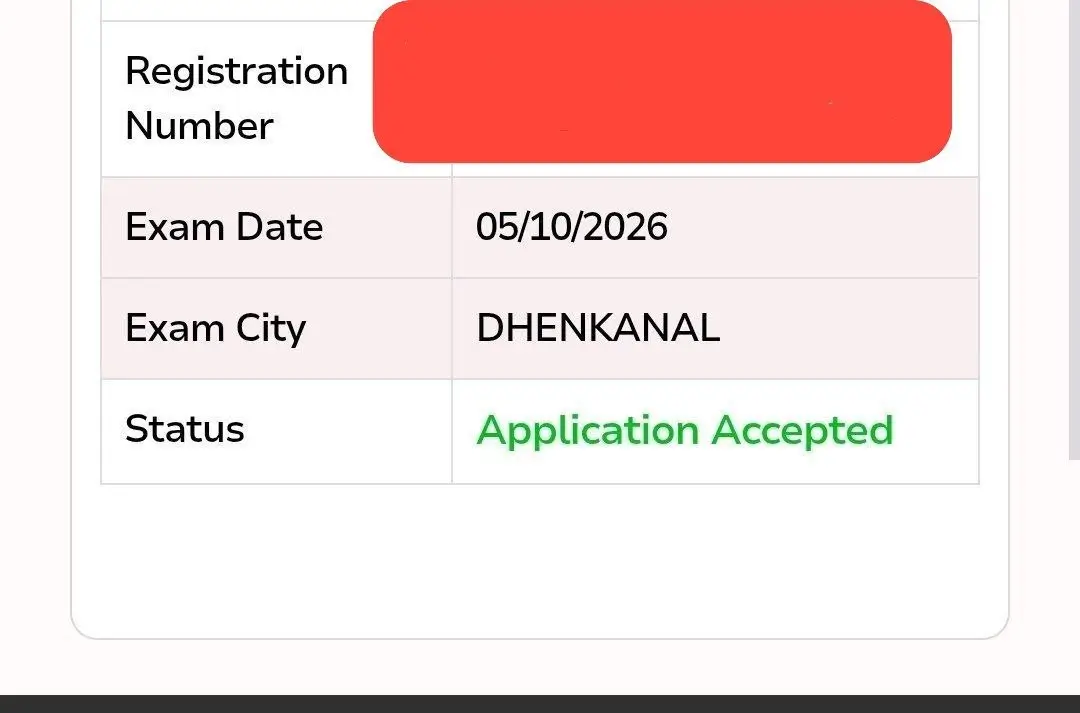
What Details are Mentioned on SSC CGL Exam City Intimation Slip 2026
The SSC CGL Exam City Intimation Slips contain the following information: candidates must cross-check all details carefully.
- Registration Number
- Exam City Name
- Scheduled Date of Exam
- Application Status
What to Do After Checking SSC CGL Exam City?
Once candidates know their allotted city, they should not simply wait for the admit card. They can:
- Check the distance between their location and the allotted city.
- Plan train, bus or other transportation.
- Arrange accommodation if the examination city is far away.
- Keep the required documents ready.
- Continue checking SSC updates for the admit card.
- Download the admit card as soon as it becomes available.
- Check the exact centre address and reporting time on the admit card.
Also Check,
SSC CGL Tier 1 Exam Structure
1. CGL Tier 1 CBT Exam consists of 100 Multiple-Choice Questions (MCQs) asked from 4 major subjects-
- General Intelligence & Reasoning: 25 questions for 50 marks
- General Awareness: 25 questions for 50 marks
- Quantitative Aptitude: 25 questions for 50 marks
- English Comprehension: 25 questions for 50 marks
2. The duration os completing the exam is 60 minutes, however, there is a sectional timing of 15 minutes for each subject.
3. For each incorrect answer, 0.50 marks are to be deducted.
4. The exam will be in bilingual language (English + Hindi) except English.
Difference between Exam City Slip & Admit Card
Candidates should note that the city intimation slip is not the admit card. It is issued in advance so that candidates can plan their travel and other arrangements. The admit card is released separately and contains the detailed examination centre address and other exam-day instructions.
| SSC CGL City Intimation Slip | SSC CGL Admit Card |
|---|---|
| Gives advance examination information | Official hall ticket for the examination |
| Shows allotted city/date information | Gives detailed examination centre information |
| Helps candidates plan travel | Required for examination entry |
| Released before the admit card | Released separately |
| Not sufficient for entering the exam centre | Must be carried to the examination centre |
SSC CGL 2026 Tier 1 Exam Centre List
The Combined Graduate Level Tier 1 Exam will be conducted across 7 SSC regions and multiple exam cities. The alloted exam city and state have been informed through SSC Exam City Intimation slips.
| SSC Regions | States/UTs Covered | SSC CGL Exam Cities |
| Central Region (CR) | Bihar, Uttar Pradesh | Bhagalpur, Muzaffarpur, Patna, Gaya, Chapra, Saharsa, Darbhanga, Purnea, Munger, Agra, Bareilly, Gorakhpur, Jhansi, Kanpur, Lucknow, Meerut, Prayagraj, Varanasi |
| Eastern Region (ER) | Andaman & Nicobar Islands, Jharkhand, Odisha, Sikkim, West Bengal | Sri Vijaya Puram (Port Blair), Dhanbad, Jamshedpur, Ranchi, Balasore, Berhampore, Bhubaneswar, Cuttack, Dhenkanal, Rourkela, Sambalpur, Gangtok, Asansol, Kalyani, Kolkata, Siliguri |
| Karnataka Kerala Region (KKR) | Karnataka, Kerala, Lakshadweep | Belagavi, Bengaluru, Hubballi, Kalaburagi, Mangaluru, Mysuru, Shivamogga, Udupi, Ernakulam, Kannur, Kollam, Kottayam, Kozhikode, Thrissur, Thiruvananthapuram |
| Madhya Pradesh Region (MPR) | Madhya Pradesh, Chhattisgarh | Bhopal, Gwalior, Indore, Jabalpur, Satna, Sagar, Ujjain, Bilaspur, Raipur, Durg-Bhilai |
| North Eastern Region (NER) | Arunachal Pradesh, Assam, Manipur, Meghalaya, Mizoram, Nagaland, Tripura | Itanagar, Dibrugarh, Guwahati (Dispur), Jorhat, Silchar, Churachandpur, Imphal, Ukhrul, Shillong, Aizwal, Dimapur, Kohima, Agartala |
| Northern Region (NR) | Delhi, Rajasthan, Uttarakhand | Dehradun, Haldwani, Haridwar, Roorkee, Delhi, Ajmer, Alwar, Bikaner, Jaipur, Jodhpur, Kota, Sri Ganganagar, Udaipur, Sikar |
| North Western Sub-Region (NWR) | Chandigarh, Haryana, Himachal Pradesh, J&K, Ladakh, Punjab | Chandigarh/Mohali, Hamirpur, Shimla, Jammu, Samba, Srinagar, Leh, Amritsar, Jalandhar, Ludhiana, Patiala |
| Southern Region (SR) | Andhra Pradesh, Puducherry, Tamil Nadu, Telangana | Chirala, Cuddapah, Guntur, Kakinada, Kurnool, Nellore, Rajahmundry, Tirupati, Vizianagaram, Vijayawada, Visakhapatnam, Puducherry, Chennai, Coimbatore, Krishnagiri, Madurai, Salem, Tiruchirapalli, Tirunelveli, Vellore, Hyderabad, Karimnagar, Warangal |
| Western Region (WR) | Dadra & Nagar Haveli and Daman & Diu, Goa, Gujarat, Maharashtra | Panaji, Ahmedabad, Anand, Gandhinagar, Mehsana, Rajkot, Surat, Vadodara, Amravati, Aurangabad/Chhatrapati Sambhaji Nagar, Jalgaon, Kolhapur, Mumbai, Nagpur, Nanded, Nashik, Pune |