
SSC Selection Post Phase 14 Answer Key 2026 Out, Download Response Sheet
- Home
- SSC Phase 14 Answer Key 2026
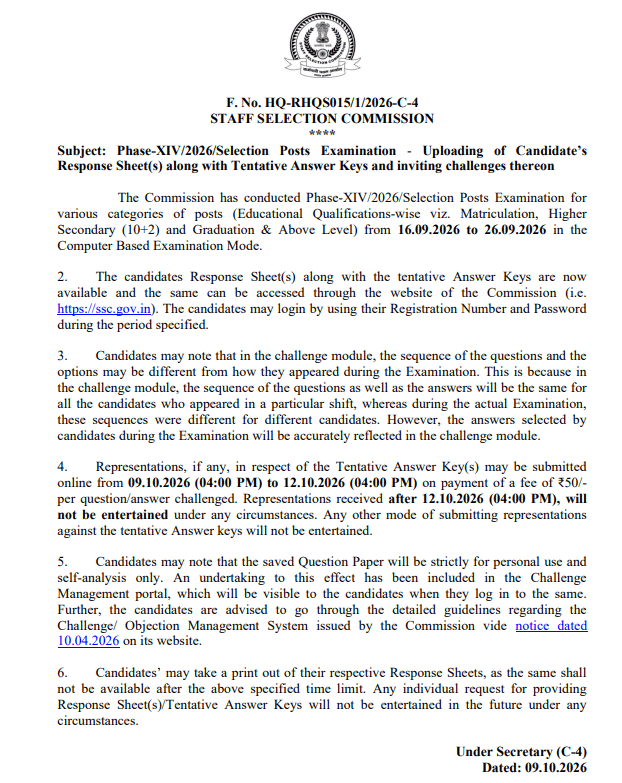
SSC Selection Post Phase 14 Answer Key 2026 has been released by the Staff Selection Commission (SSC) at www.ssc.gov.in. Candidates who appeared for the Selection Post Phase XIV Computer-Based Examination can download their provisional answer key, question paper, and individual response sheet from the SSC official website. Candidates need their registration number and password to acess the answer key.
The response sheet helps candidates review their attempts and estimate their marks before the result is declared. Those who disagree with a provisional answer can also submit a challenge before 12 October 2026 (4 pm) at www.ssc.gov.in with a fee of Rs. 50 per objection.
SSC Phase 14 Answer Key 2026 Link
The provisional solutions and individual response sheets are available through the Staff Selection Commission's official portal. Candidates should use their registered login credentials to access the examination details. The response sheet is available for a limited period, so candidates should save a copy for reference.
SSC Selection Post Phase 14 Official Answer Key 2026 Link (Active) - Click to Download
Login Details Required to Download Official Answer Key
To download an official exam answer key or response sheet, candidates need-
- Username (Registration Number): Assigned to you during the SSC One-Time Registration (OTR) or application process.
- Password (SSC Registration Password): Your account password or date of birth (as specified in the specific exam notification)
How to Download SSC Selection Post Phase 14 Answer Key 2026?
The SSC Selection Post Phase XIV Answer Key PDF has been uploaded on the official website of the Staff Selection Commission (SSC) and can be downloaded by following the steps provided below.
- Open the official website of the Staff Selection Commission (SSC), www.ssc.gov.in, in your internet browser.
- On the SSC homepage, search for the “Login” option.
- Enter your user ID/registration number and password. Fill in the captcha code and click on “Login”.
- Click on the Answer Key Challenge as shown below under the My Application Tab.
- Select the Level of Examination and click on the “Click Here” button
- The candidate’s response sheet is displayed.
- Download the SSC Selection Post Phase 14 Answer Key 2026 and cross-check the answers mentioned on it.
What to Do If Response Sheet Is Not Opening?
Candidates may occasionally face login errors or difficulty viewing their recorded responses. Try the following solutions before contacting the Commission:
- Check your login credentials: Enter the details requested on the official SSC portal carefully.
- Retry after some time: Temporary server load may prevent the response sheet from opening.
- Use an updated browser: Open the portal in a supported, updated browser and try again.
Official Notice
SSC Selection Post Phase 14 Answer Key 2026! Share Your Response Key
Raise Objection Process
Candidates who find any incorrect or doubtful answer in the SSC Phase 14 Answer Key 2026 can raise objections against the provisional answer key from 9 to 12 October 2026 (4 pm). To submit an objection, candidates must provide valid supporting proof and pay an objection fee of Rs. 50/- per question through the official SSC website.
Click Here to Raise Objection to SSC Phase 14 Answer Key 2026
Raise Objection Fee
Candidates can download the provisional answer key from the SSC official website. Candidates can submit online representations, if any, within the stipulated time limit on payment of Rs. 50/- per question, which is non-refundable.
How to Raise Objections Against the SSC Selection Post Answer Key
- After logging into the website of SSC, click on “Click Here to Challenge Question”; you will be redirected to the challenge screen (given below).”
- Select the appropriate complaint type from the available drop-down list.
- Clearly describe the issue or provide details regarding your grievance.
- If required, choose and upload a scanned image (PDF or JPG) (size not more than 3MB) supporting your grievance.
- Once all details are entered, click on “Proceed to Pay” to submit your grievance and proceed to make the payment.
- Please note that the challenge submission is not complete till payment is made successfully.
- Click on the “Proceed for payment” button.
- Click on the “View Grievance Question” option to review the questions for which you have already submitted grievances
Details to Check in the Response Sheet
After opening the document, verify the following information wherever displayed:
- Candidate name and roll number
- Examination level and date
- Shift or test-session details
- Questions and options recorded during the examination
- Answers indicated in the provisional key
SSC Selection Post Phase 14: Overview
SSC Selection Post Phase 14 Computer Based Examination 2026 was conducted from 16 to 27 September 2026 to recruit candidates for 2,919 vacancies across 10th pass, 12th pass, and graduate-level posts. Candidates need their registered login credentials to view their individual responses and the provisional answer key.
| SSC Selection Post Phase 14 Answer Key 2026- Overview | |
|---|---|
| Organization | Staff Selection Commission (SSC) |
| Post Name | Selection Post |
| Exam Name | SSC Selection Post Exam |
| Vacancies | 2919 |
| Answer Key | 9 October 2026 |
| Raise Objection Dates | 9 to 12 October 2026 (4 pm) |
| Exam Date | 16, 17, 18, 19, 21, 22, 23, 24, 25, and 26 September 2026 |
| Marking Scheme | 2 marks awarded for each correct answer and a deduction of 0.5 marks for each incorrect answer |
| Official Website | www.ssc.gov.in |
SSC Selection Post Phase 14 Marking Scheme
The candidates can calculate their marks following the marking scheme decided by SSC. There will be a total of 100 questions (25 questions for each subject). Each question carries 2 marks, and there will be a penalty for each wrong answer, i.e., 0.50 marks. Cross-check the responses with the SSC Selection Post Phase 14 Answer Key and calculate the marks.
- Correct Answer: +2 Marks
- Incorrect Answer: -0.50 Mark
- Total Marks: 200
How to Calculate Marks?
Candidates can calculate their probable scores by cross-verifying their responses with the provisional answer key using the below-given marking scheme.
Expected Score = (Correct Answers x 2) – (Incorrect Answers x 0.50)
For Example:
If a test-taker answers 75 questions correctly, 15 incorrectly, and leaves 10 questions unattempted, then
- Marks for correct answers = 75 × 2 = 150
- Negative marking = 15 × 0.50 = 7.5
- Total marks estimated = 150 − 7.5 = 142.5 marks
What Happens After the Objection Window?
SSC reviews challenges according to its examination procedure. The Commission may revise its provisional solutions after considering valid representations and subsequently publish the final answer key or results as per the official schedule.
Provisional Answer Key → Objection Submission Window → Evaluation of Objections → Final Answer Key → Result and Shortlisting
Minimum Qualifying Marks
Candidates must score the minimum qualifying marks as per their category to qualify in the SSC Phase 14 Exam.
| Category | Minimum Qualifying Marks | Minimum Percentage |
| General (GEN) | 60 | 30% |
| OBC-NCL / EWS | 50 | 25% |
| SC / ST / PwD | 40 | 20% |
| Related Links | |
| SSC Selection Post Phase 14 Syllabus 2026 | SSC Selection Post Cut Off [Previous Year] |
| SSC Selection Post Previous Year Question Papers | SSC Selection Post Salary |