
Kerala PSC Thulasi Login 2026 @ thulasi.psc.kerala.gov.in, My Profile, OTR Registration
- Home
- Kerala PSC Thulasi Login
Last Updated: 25 September 2026
Kerala Public Service Commission (KPSC) has introduced the Thulasi portal for candidates to complete One Time Registration (OTR), apply for notified posts, manage their profile, and access various recruitment-related services. Candidates who have been registered can access their Kerala PSC Thulasi account by providing the User ID, password, and the required security code. However, candidates who have not completed the registration process can create their profile through the process of One Time Registration on the Kerala PSC website.
The official Kerala PSC website provides separate options for One Time Registration, login, new registration, and candidate instructions. It must be noted that candidates should always choose the official Kerala PSC website while giving their login credentials.
What is Kerala PSC Thulasi Login 2026?
The KPSC Thulasi Portal is an official online platform launched by the Kerala Public Service Commission (KPSC) to simplify the recruitment process for government jobs in the state. It has been designed to make the recruitment process more transparent, efficient, and accessible to applicants across Kerala.
KPSC Thulasi Login: Latest Updates 2026
- 04 Jul 2026: Candidates applying for Gazetted and Police-category posts must confirm Aadhaar linkage in their OTR profile before the "Apply Now" button becomes active; unlinked profiles are being flagged during application.
- 03 Jun 2026: KPSC released the June–July 2026 examination programme. Hall tickets for these exams are being issued department-wise inside the "My Profile" dashboard as each date approaches.
- 30 Apr 2026: The 10-year OTR photo validity rule is now being enforced strictly. If your profile photo was uploaded before 2016, re-upload a fresh photo with your name and date printed at the bottom, or the apply option may stay disabled.
- Ongoing KPSC continues to publish fresh Category Notifications through the year - bookmark this page and check the Notification tab on Thulasi regularly rather than relying on email alone.
Kerala PSC Thulasi Login 2026 – Overview
The Thulasi portal helps candidates create a One-Time Registration (OTR) profile, apply for Kerala PSC jobs online, download hall tickets for exams, and check their result status, all in one login.
| Kerala PSC Thulasi Login Overview | |
| Organization | Kerala Public Service Commission (KPSC) |
| State | Kerala |
| Registration Status | Active |
| Registration Mode | Online |
| Services Offered | Registration, Application, Admit Card, Result, Notifications |
| Registration Fee | No Fee |
| Registration Page | https://thulasi.psc.kerala.gov.in/thulasi/ |
| Official Website | www.kerala.gov.in |
KPSC PSC Thulasi Login Process
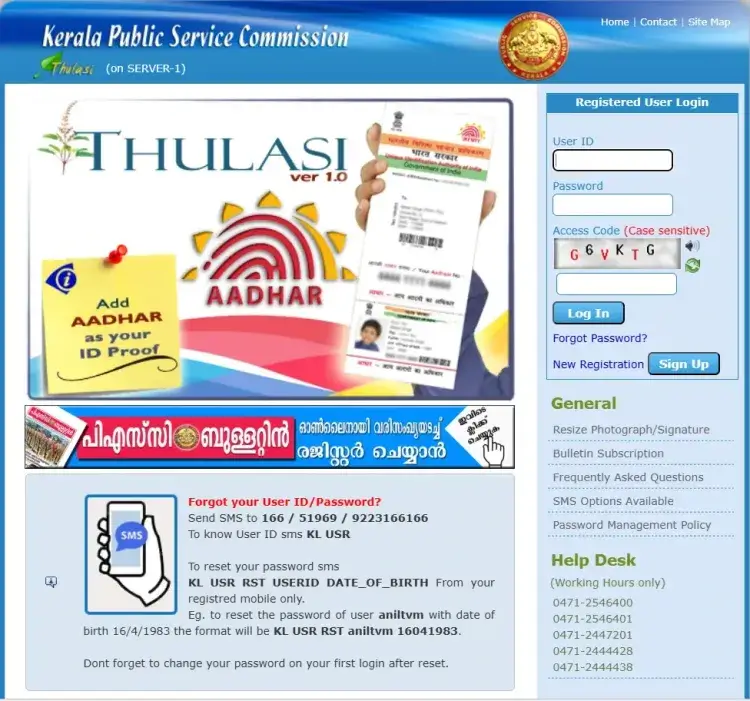
To log in to the Kerala PSC Thulasi portal, enter your User ID, password, and access code. Note that both User ID and password are case-sensitive.
- Visit the Kerala PSC Thulasi official login page.
- Now enter your User ID, password, and access code.
- Click on the “Login” button.
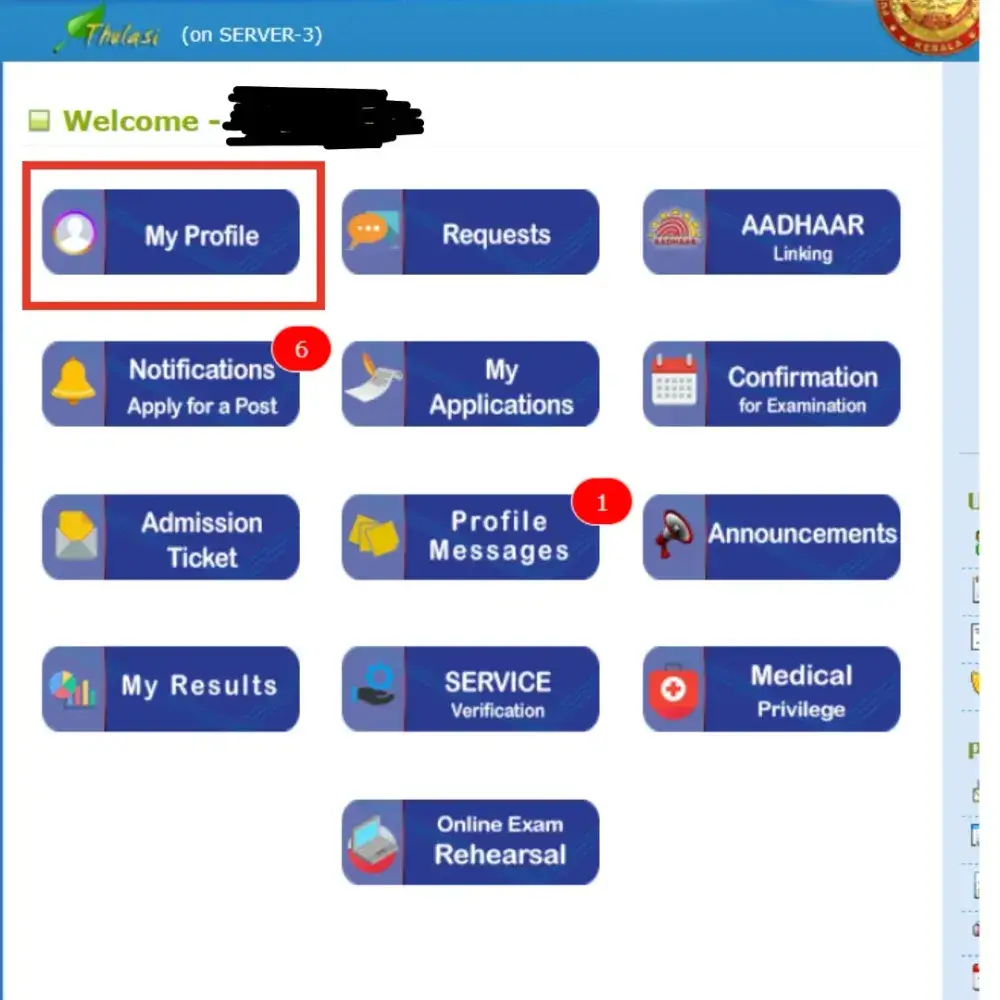
- You will be redirected to the My Profile page, where you can view and update your details.
Kerala PSC Thulasi Login Portal Link 2026
Kerala PSC Thulasi Login is the online portal of the Kerala Public Service Commission (KPSC), which helps candidates manage their job applications and recruitment activities in Kerala. The portal is available at https://thulasi.psc.kerala.gov.in. If you want to register on the portal, click the provided link. Then, follow this simple step-by-step guide to register and log in to the KPSC Thulasi portal.
Kerala PSC Thulasi Login 2026- Click to Register
Kerala PSC Thulasi My Profile
After logging in successfully, candidates can view their Kerala PSC Thulasi My Profile. The profile consists of the information submitted by the candidate at the time of One Time Registration. Candidates need to keep their profile information up to date as far as the Kerala PSC allows. Depending on which services are offered through the candidate account, the profile area offers access to information such as
- Personal details
- Communication details
- Educational qualifications
- Employment-related information
- Applications submitted for notified posts
- Recruitment-related information
- Examination-related services
- Other candidate services provided by Kerala PSC
What is Kerala PSC One Time Registration (OTR)?
Kerala PSC One Time Registration (OTR) is the process wherein a candidate registers himself/herself for the Kerala Public Service Commission. A candidate who wishes to apply for Kerala Public Service Commission posts is generally required to make one-time registration and create a candidate profile before applying for any of the vacant posts notified for Kerala Public Service Commission.
The main advantage of One Time Registration (OTR) is that the applicant need not enter the same basic details for every single Kerala PSC recruitment notification. The candidate can simply log in and apply for those posts notified for Kerala PSC for which he/she is eligible.
Kerala PSC Thulsi Login New Registration
New users must register to get a User ID and a Password to check the recruitment activities. Follow these simple steps to register themselves through the Kerala PSC Thulsi Login Portal.
- Visit the official Kerala PSC Thulasi web portal: https://thulasi.psc.kerala.gov.in/thulasi/
- On the homepage, click on "New Registration".
The registration process consists of five steps:
- Filling Personal Details: Fill in the required details like Name, Date of Birth, Gender, Father Name, Mother Name, Religion, Caste, Sub Caste, ID proof etc.
- Communication Details: Mobile Number, Email and Address
- Upload Photograph: 150 × 200 pixels, maximum size 30 KB, front facial pose, light background, and a clear face.
- Upload Signature:150 × 200 pixels, maximum size 30 KB.
- Preview and Submit: Candidates must complete all five steps to finish registration and get their unique User ID.
Kerala PSC Thulasi Login Help Desk and Support
- Helpline numbers: 0471-2546400, 0471-2546401, 0471-2447201, 0471-2444428, 0471-2444438
- Email support: keralapsc@keralapsc.org
- An FAQ section on the Thulasi portal itself answers common queries quickly.
Documents Required for KPSC Thulasi Registration
Keep the following documents ready before starting registration to avoid delays:
- Recent passport-size photograph
- Scanned signature
- Email ID and mobile number for registration and OTP verification
- Aadhaar Card or any valid Photo ID proof (Voter ID, PAN, Driving License, etc.)
- SSLC / 10th certificate (for date of birth and education verification)
- Educational qualification certificates
- Community or caste certificate
- Domicile certificate (for Kerala residents)
Kerala PSC Thulasi Login 2026 Photo & Signature Specifications
While filling out the Kerala PSC Thulasi Login 2026, candidates need to upload their photographs and signatures in a prescribed format which has been discussed in detail below.
- Photograph - Must be 150px (Width) x 200px (Height) and under 30 KB.
- Photo Text - Your name and the date the photo was taken must be printed at the bottom in black ink on a white background.
- Validity - For new registrations, the photo must be taken within the last 6 months. Once uploaded, it remains valid for 10 years.
- Signature - Must be on white paper using blue or black ink, scanned at 150px x 200px, and under 30 KB.
Common Kerala PSC Thulasi Login Issues & Fixes
- "Apply Now" button is disabled- Usually caused by an outdated profile photo (pre-2016 upload) or a missing mandatory field such as Aadhaar for Gazetted/Police posts. Update the flagged section in My Profile first.
- Login page not loading or very slow- Traffic spikes heavily after a result or hall-ticket release. Try again during off-peak hours, clear your browser cache, or use a different browser.
- OTP not received- Confirm your registered mobile number is active and has network coverage; wait a few minutes before requesting a fresh OTP, and check that SMS is not being blocked (e.g., DND settings).
- Forgot both User ID and password- Use the SMS recovery format for the User ID first, then use "Forgot Password" with the recovered ID, your date of birth, and Unique ID.
Forgot Kerala PSC Thulasi Password? Here’s How to Reset
If you forget your password, don’t panic, as it’s easy to recover access. Candidates can follow the steps provided below to reset the password.
Forgot Password:
- Click the “Forgot Password?” link on the registration page.
- Enter your User ID, Date of Birth, and Unique ID to reset your password.
Forgot User ID:
- Call the Help Desk number on the main page and provide your details to retrieve your User ID.
- Helpline Numbers: Call 0471-2546400, 0471-2546401, 0471-2447201, 0471-2444428, or 0471-2444438 for assistance.
- Email Support: Contact via email at keralapsc@keralapsc.org for help.
Kerala PSC Thulasi Login and OTR Guide, Eligibility & Application Process
| Topic | Details |
| One-Time Registration (OTR) |
|
| Document Upload Requirements |
|
| University/Subject Not Listed |
|
| Eligibility Test Not Listed: | Choose the major stream (Science, Humanities, Commerce). This won’t affect eligibility. |
| How to Apply |
|
| Before Applying |
|
| After Application Submission |
|
Kerala PSC Thulasi Mobile App
The Kerala PSC Thulasi Mobile App is available free on the Google Play Store. It brings the core features of the web portal — login, profile updates, and applying for exams — into a mobile-friendly format.