
APCOB Admit Card 2026 Out for Assistant Manager & Staff Assistant Online Exam, Download Link
- Home
- APCOB Admit Card 2026
Last Updated: 19 September 2026
Andhra Pradesh State Co-operative Bank (APCOB) released the APCOB Admit Card 2026 on 18 September 2026. The APCOB online exam is scheduled for 25 September 2026 for the recruitment of 338 Assistant Manager & Staff Assistant vacancies. Candidates appearing for the exam must carry a printout of the admit card and a valid ID proof to the exam center for verification, as no entry will be allowed without them.
APCOB Admit Card 2026 Out
To download their admit cards, candidates will be required to provide their login details, i.e., their Registration No/Roll No. and Date of Birth/Password. Candidates can check complete exam details such as exam date, timing, exam venue, reporting time, etc through their respective admit card.
APCOB Admit Card 2026- Overview | |
|---|---|
| Mode of Exam | Online |
| Admit Card | 18 September 2026 |
| APCOB Exam Date 2026 | 25 September 2026 |
| Mode of Exam | Online |
| Details Required to Download | Registration No/Roll No and Date of Birth/Password |
APCOB Admit Card 2026 Download Link
The admit card for the recruitment of Assistant Manager/Staff Assistant posts has been released online at the official website of www.apcob.bank.in. No hard copy of the admit card is sent to the candidates. The admit card link will remain active till the exam date i.e. 18 September 2026; candidates must download their admit cards well before the exam date to avoid any technical glitches at the last moment.
APCOB Admit Card 2026 Download Link (Active) - Click to Download
How to Download APCOB DCCB Staff Assistant Call Letter 2026?
Candidates who need to know how to download the admit card can follow the steps provided below to download their APCOB DCCB Staff Assistant Call Letter 2026;
- Visit the official website of Andhra Pradesh State Co-operative Bank (APCOB) at www.apcob.bank.in.
- On the homepage, locate and click on the “Career” section.
- On the Career section, click on the text reading “Call letter/Admit card for the examination of Staff Assistant & Manager Scale-I”.
- A new login page appears on the screen.
- Enter login details, i.e., Registration No/Roll No. and Date of Birth/Password.
- Fill in the captcha code and click on the Login tab.
- After submitting the details, the APCOB Admit Card 2026 appears on your screen.
- Verify all the details and download it for future reference.
Details Mentioned on APCOB Admit Card 2026
While downloading the APCOB Admit Card 2026, candidates must cross-check the information. If there is any discrepancy, it should be immediately reported to the authorities for correction.
- Candidate’s Name
- Father’s Name
- Registration Number
- Roll Number
- Gender
- Category
- Date of Examination
- Reporting Timing
- Exam Timing
- Exam Venue
- Candidate’s Passport-size Photograph
- Signature of the Appointed Examiner
- Important Instructions
Things to be carried to the APCOB Exam hall?
Candidates who are willing to take the examination must make sure they have the following documents/things with them. Without all these things, no candidates will be allowed to enter the examination hall.
- Printout of APCOB Admit Card 2026
- Transparent water bottle
- Blue/Black ballpoint pen
- Valid ID Proof issued by the government
- PAN Card
- Passport
- Driving Licence
- Aadhaar Card
- Voter’s ID
Things Prohibited at the APCOB DCCB Staff Assistant Exam 2026 Centre
Other than the hall ticket 2026, identity proof, and two passport-sized photographs, candidates are advised to make sure they do not carry any other documents/objects to the exam centre.
- Textbooks, notebooks, or any study material
- Mobile phones, smartwatches and fitness bands
- Bluetooth devices
- Calculators
- Digital watches
- Electronic gadgets
- Bags, wallets, or purses
- Geometry boxes, pencil boxes or pouches.
APCOB Exam Structure 2026
Candidates appearing for the exam must be aware of the exam structure, marking scheme, topics asked in the exam, and other details,
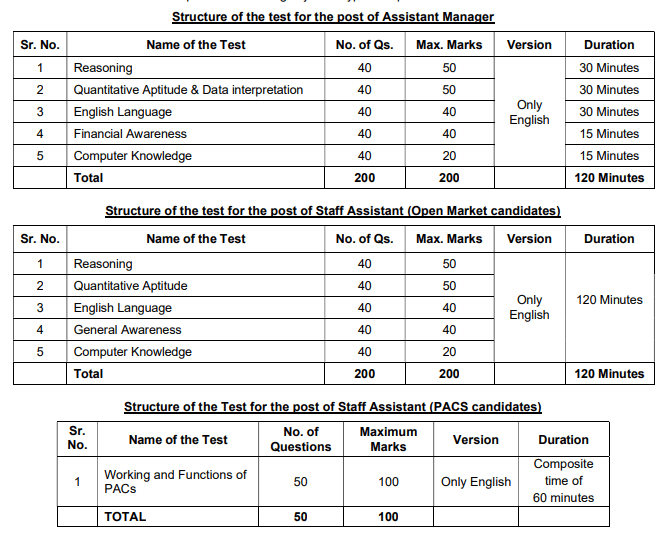
APCOB Staff Assistant Syllabus and Exam Pattern 2026- Click to Check
APCOB Staff Assistant Previous Year Question Papers- Click to Download